InDrive 1.3

InDrive - Night mode

  • Swipe up/down to scroll through shortcuts.
  • New display modes: Day, Night and Auto.
  • Auto switch between modes at sunrise/sunset.
  • Quickly change songs by swiping up/down.
  • Improved track recording.
  • Added option to clear the log file.
  • GPX files now contain track segments.
  • Fixed: Pandora shortcut does not work.
  • Trial period increased to 30 days.

InDrive is now on sale.

We are lowering the price of the InDrive Unlocker to just $0.99. Moreover, 20 randomly selected people who place an order over the next few weeks will receive the Pro version of SpeedView as a gift. Winners will be notified by email, and their names will be posted here.

This is a limited time offer, so act quick!

SpeedView 3.1

SpeedView - Hybrid speedo layout

  • New hybrid speedo layout
  • Added option to invert indicator colors
  • Keep running when the screen is locked
  • Minor bug fixes and improvements

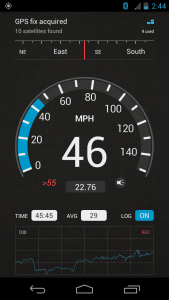
This update includes a new speedometer layout that we call Hybrid. It’s an updated version of the initial speedo layout that features an analog-like dial with big speed numbers in the center. We are keeping the Legacy layout in case you would still want to use it.

Note: To clarify the situation with the Free version, we would like to stress that it’s not “canceled”, as some reviews seem to say. It’s fully functional, and you can use it for as long as you like. However, we decided to focus on the Pro version in the future. Here are the advantages that the paid version has over SpeedView Free:

  1. The absence of ads
  2. Street address bar with some additional info
  3. Premium support – you will get an answer within a day

InDrive 1.2

  • Run in the background
  • Enable track logging
  • Min distance between points
  • Min time between points
  • Disable Poweramp integration
  • Mute notification sounds
  • Vibrate on press
  • Quickly view album info
  • The app now remembers the last used screen

Note: If you are experiencing the issue with the app randomly closing without any errors, try disabling integration with Poweramp in the app settings. This is a confirmed problem in Poweramp that unfortunately affects InDrive when integration is enabled. It should be fixed in the next Poweramp update.

InDrive 1.1

  • Minimum accuracy
  • Filter the GPS speed
  • Clear individual data
  • Hide the action bar
  • Two more shortcut pages
  • Better screen space usage
  • Improved Poweramp integration
  • Fixed: Force close when direct calling

Google Play

Download APK

Note for Android 4.2.x users: Unfortunately, it appears that Google has removed dock home support in Android 4.2. Pressing the Home button will now return you to the launcher screen instead of InDrive or other car home app of choice. If you would like this feature back, please vote for this issue.