SpeedView – GPS speedometer for Android

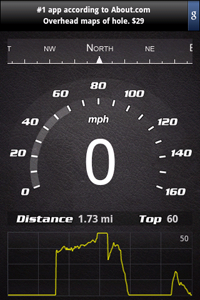
SpeedView screenshot

We would like to introduce our new app – SpeedView for Android. It’s an advanced GPS speedometer that uses the phone’s built-in GPS system to show your current and top speed, direction, and distance traveled. Successfully tested using T-Mobile G1, Samsung Galaxy, Motorola Droid, and Nexus One, it’s suitable for running, car driving, biking, or hiking.

Features:

  • Compass
  • Distance
  • Top speed
  • Speed graph
  • Display units: mph, km/h, and knots
  • Speed warning HUD (mirrored) mode

The free, ad-supported version of SpeedView is available now for download on the Android Market. The paid version with some additional features is coming soon.

Maverick 1.1.7 – offline maps with multi-touch

What’s new in this version:

  • Multi-touch.
  • Knots and nautical miles.
  • Better integration with Google Earth.
  • Bugfixes.

Multi-touch is an over-hyped technology, especially when used in a browser and maps 🙂 In the Android browser, I’ve changed zoom 2-3 times this year, when the font size was too small. If you think it could be useful for zooming maps, try to do it with one hand 🙂

But multi-touch is very helpful in other cases: games, software keyboards, touchpads in MacBook. It’s good to have it as an additional input method. That’s why it’s supported by Maverick now. Works on Android 2.0 (even if you have it on G1) and Cyanogen mods (uses this hack).

maverickgps.com