What’s new:

  • Added MapQuest and Ordnance Survey maps
  • Full support of custom maps and map servers
  • UI adaptation for Galaxy Nexus
  • Better compass support
  • Barometer altitude on Galaxy Nexus, Xoom…
  • No map flickering on tablets
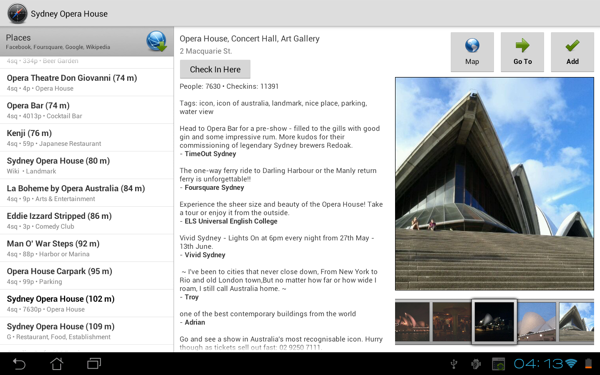
  • See nearest places on Foursquare and Wikipedia

UK Maps

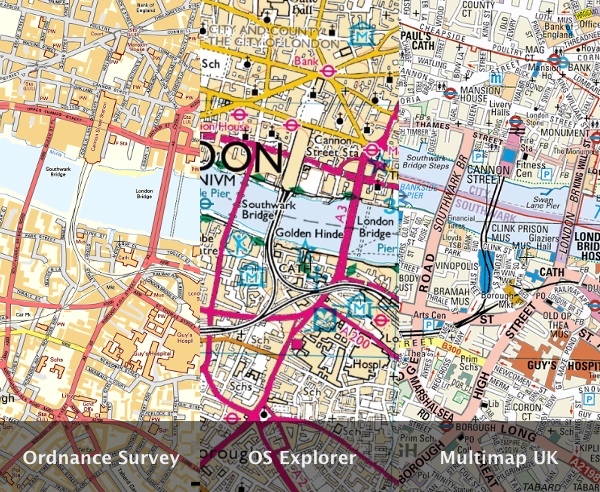
There are currently 3 different UK maps in Maverick – Ordnance Survey, OS Explorer and Multimap:
At zoom level 9:
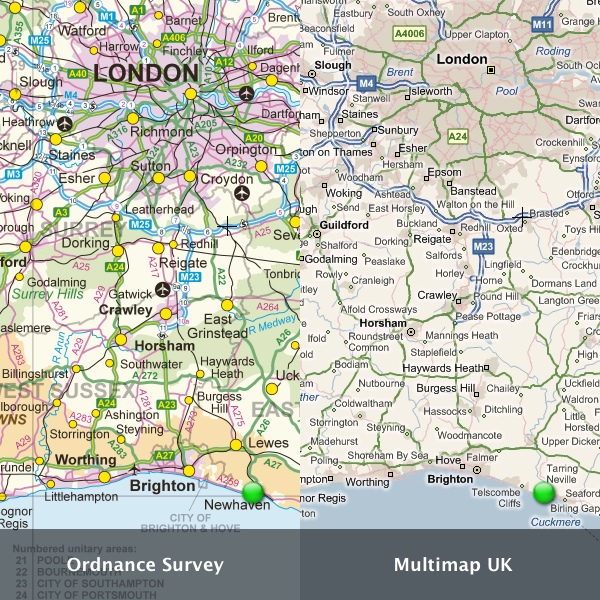
Multimap and OS Explorer maps are served by Bing. Ordnance Survey has a limit of 65 000 tiles of mapping data in a 24-hour period (for all users), but you can register your own key.

Download mapserver.txt to sdcard/maverick/tiles/Ordnance Survey Map/ folder and replace —— with your key and site url.

Support of custom maps and map servers

Now you can simply copy any folder with the downloaded map to maverick/tiles folder and select this folder in Maverick. If this map isn’t built-in and you know the map tile server, see these instructions.

Places on Foursquare, Wikipedia and Google

Maverick will list all places from these services around your current or selected location. You can read Wikipedia articles and see comments and photos on Foursquare venues. All found places can be added to your waypoints and used for compass navigation.
Maverick Pro 2.0

12 thoughts on “Maverick Pro 2.0

  • May 22, 2012 at 10:13 am
    Permalink

    i have galaxy tab 8.9 and Maverick Pro.
    although i import my kml files to waypoints folder /sdcard/maverick/waypoints that doesn’t seem to work, i can’t see them all. Could you please assist?thanks in advance.

  • May 22, 2012 at 10:58 am
    Permalink

    sorry for lack of information, the real issue is, i have trouble with importing bulk waypoints.
    i am exporting 10 waypoints from my maps in kml format and i does not seem to open in waypoints folder on my tab.

  • June 3, 2012 at 3:50 am
    Permalink

    Hello
    I have Maverick Pro installed on my Galaxy Note running ICS. The app will not save tracks. I put in a support request 10 days ago and yet nobody has got back to me which is very frustrating. Can someone please help. Thanks.

  • June 22, 2012 at 11:13 am
    Permalink

    Any plans to implement tile scaling for zoom levels that have not yet been downloaded?

  • July 27, 2012 at 11:13 pm
    Permalink

    Maverick is great – what I’m missing is a kind of screen magnifier like it is implemented in windows. That would allow me to read the name of places on the map without my glasses. For me that would be another killer feature.

  • July 30, 2012 at 8:54 am
    Permalink

    It is a great product that I have been using for mountain biking. It would suggest a trackback feature.

    • November 21, 2012 at 7:42 pm
      Permalink

      Added in version 2.2

  • August 19, 2012 at 4:00 am
    Permalink

    Your screen shot is in landscape mode, I cannot get it to switch on my Nexus 7 (which has free rotation enabled, and all other apps do switch orientations). Maverick pro does not switch, Maverick lite 1.95 does it manually.

  • August 19, 2012 at 4:01 am
    Permalink

    How does one switch between miles and kilometers in Maverick Pro on a Nexus 7 ? I do not see a Settings menu anywhere, not mentioned in online help either.

    • November 21, 2012 at 7:41 pm
      Permalink

      Fixed in version 2.2

  • October 27, 2012 at 4:24 pm
    Permalink

    Hi! How can I integrate
    the Google Maps to the Maverick (b’cause I didn’t find in Maverick Pro at the maps)

    Please help someone (if possible) THX

  • November 20, 2012 at 8:03 pm
    Permalink

    hey i just noticed i cannot pan, zoom, or scroll the map by touching the screen the only way to move the map is with the trackpad on my mytouch4gslide. will you fix this please ?

Comments are closed.