- Added: Ability to switch file dialogs to Large and Extra Large Icons modes.
- Added: Changing ‘Load at Windows startup’ option without admin rights.
- Fixed: Auto set view and sort modes under Windows Vista/7.
- Fixed: Detecting currently open Explorer windows.
- Fixed: Showing the path of the current executable for 64bit apps.
- Added: Support for Total Commander 8.01rc4
- Fixed: Double-clicking in file dialogs with file grouping.
- Fixed: Not showing drives with more than 1 TB in size.
Almost all features should be working now under Windows 7/8. The main menu was also redesigned a little and new icons were added:
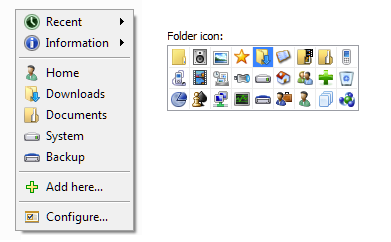
Download: codesector.com/files/directfolders.exe
Direct Folders 3.72
Yay! I’m very happy to see Direct Folders getting some love. It’s still one of my favorite and most useful Windows add-ons.
This is by far my most favorite and useful app. Now if you only can get the mouse click working in Firefox. Regardless, keep these updates coming!
DF is unable to intercept clicks in Firefox, but you can use buttons in Info Panel or hotkeys to access the menu.
Firefox support is the ultimate feature we need. DirectFolders is a masterpiece.
Sorry, my english is very very poor.
The reason why DF can not work with Firefox normally is very simple.
Firefox block an unsafed dll named “hook.dll”, and … yes, Direct Folder just have a “hook.dll” with the whole same name.
May Direct Folder master just rename “hook.dll” to “dfh32.dll”, and the problem with firefox shall be gone.
Thanks, I’ll fix it soon.
Hmmm. I just installed the update, entered my Pro registration code, and the “about” window tells me I have version 1.0.0.0. What’s more, I’m unable to open folders from the taskbar icon. Disappointing, since I’ve been waiting for this update for a long time.
Fixed, please re-download.
Nice to see Direct Folders further developed, as it’s the best alternative to the defunct Flash Folder. I mainly use DF to center and resize file requesters, which should have been a Windows feature since Win95.
Version 3.72 seems to be the first one compatible with previously problematic apps like Google Chrome, which is great. However, I noticed the configuration panel is now systematically opened during Windows startup, which is quite annoying. That didn’t happen in previous versions.
It’s probably because DF starting twice, from Registry (old method) and from Startup folder.
Spot on. Thank you Jeff for the heads-up!
It seems the middle click isnt working anymore. Using Windows 7 64Bit
I am also on Win7 64bits. My experience is it works perfectly, inc the middle button. Issue is after a while, it failed. So far my suspicion is due to hibernation that trigger this issue. Unload / Quit it, and re-start it does not resolve it. My solution is to re-login. If need to test any beta code, I can offer to help.
DF – the best
Директ Ñ„Ð¾Ð»Ð´ÐµÑ€Ñ – Ñто проÑто Ð»ÑƒÑ‡ÑˆÐ°Ñ ÑƒÑ‚Ð¸Ð»Ð¸Ñ‚Ð° в Ñвоем роде. Ðичего проще, удобнее и быÑтрее Ñ Ð½Ðµ вÑтречал.
Great utility. Thank you very much.
Two Request:
* New version added to large Icons. For new big monitor. Ok. But where is option old small icons modes? I prefer to small icons. At least, add to a option “small icons”.
* Portable support. DirectFolders always save settings to “%appdata%Direct Folders”. Is impossible save to installed folder?
Sorry my English is very very poor.
Firefox block an unsafed dll named “hook.dll”, and … yes, Direct Folder have a hook.dll with the whole same name.
Can I just rename hook.dll to hok.dll or Direct Folder can make an update to rename “Hook.dll” to prevent be block by firefox?
I’ll fix it soon.
A portable installation would be fantastic !
I uninstalled and reinstalled but still see older main menu (no icons different options). version says 3.72 in about. Is there something I need to nuke?
thx
mm interesting had old icons for two reboots then oddly on another reboot now I have new menu, odd that!
DF installer won’t overwrite your old icons and settings. Just delete Icons folder and reinstall.
the program is failing by double-click or win-key + Q , after opening some programs o browser for not reason. What do I have to check , df.exe is activated. It doesn’t matter if i restart it over and over. IF i restart the computer, Direct folder is working fine….after using my computer , its got disable
Try version 3.62 rather
DF version 3.73, most current version of Chrome and IE…… DF loads on start up and works fine for a while and then the double click or shortcut keys stop working. Reboot and everything works for a while again. This has been an ongoing problem for the past few versions. I keep hoping this problem gets fixed as I’d like to purchase the Pro version but won’t do that if the same problem exists with Pro. Thanks
Direct Folders is a masterpiece. Thank you!!
Using the 64 bit version in Windows 7 (latest release) I notice that double click on the desktop
(for example) does not work after awhile. The problem seems to occur after another program
is a particularly heavy user of CPU, e.g., a backup of a system image.A reboot is needed to
fix the problem.
Thanks again for the fine software.
Ever yours
Bob